


Climb & Jump: Obby 3D Tower
3.37.00 Reviews
App Specs
- Version
- 1.1.8
- Updated On
- License
- Free
- Downloads
- 5,000,000+
- Developer
- Metagame.Ltd
- Categories
- Adventure
- Platform
- Android
Screenshots

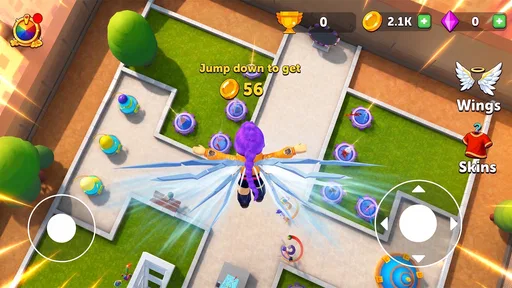
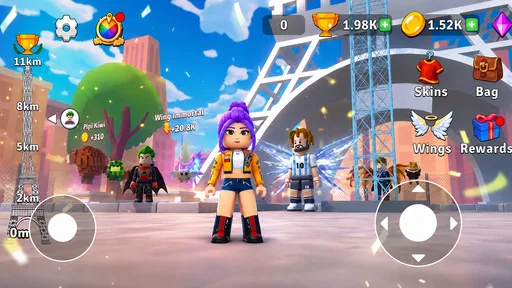
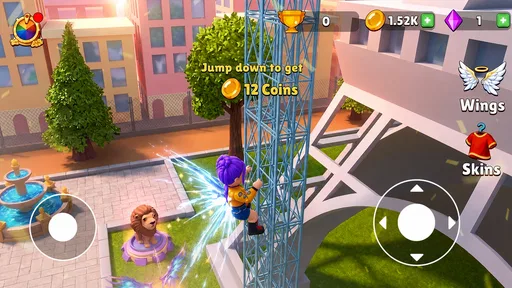
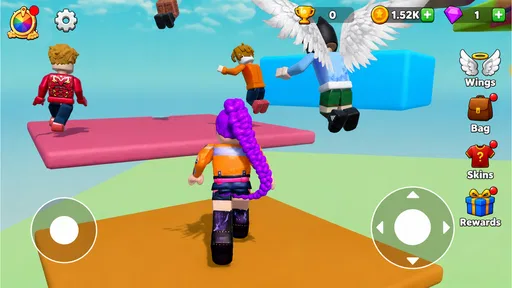
 Analysis by AppCompare
Climbing a tower sounds simple until one missed jump sends you back to a lower stretch and you have to decide whether to try again or hand the phone to someone else. That small, immediate challenge is the appeal of Climb & Jump: Obby 3D Tower, an adventure game from Metagame.Ltd. I see it as a casual choice for short turns on a shared device: the objective is easy to understand, and nobody needs a long explanation before taking a shot at the climb.
Its premise is deliberately focused on moving upward through an obstacle course. That makes it easier to pick up than an adventure game built around a long story, inventory management, or complicated controls. But a straightforward goal is not the same as a relaxing experience. Platforming asks for timing and attention, so the game is best suited to people who enjoy retrying a tricky jump rather than those who want a calm, hands-off distraction.
Why the tower works for quick shared turns
I like how the tower’s clear, visible goal makes a quick handoff feel natural, but sharing a device works best when everyone agrees on the turn before play begins. In this section, I’d focus on keeping attempts fair and low-pressure, especially when players have different levels of patience or skill. That practical approach leads into the small setup choices that can prevent confusion once the phone is in someone else’s hands.
A simple challenge that is easy to pass around
On a household phone or tablet, this kind of game can work well when people want to take turns without setting aside a full session. One person can attempt a section, then give the device to another. The shared goal is visible: make progress up the tower. You do not need to explain a character build or catch someone up on a plot before they can play.
I would treat that as informal turn-taking, not as a built-in multiplayer or family feature. The useful part is the game’s clear physical challenge: watching someone judge a jump can be entertaining even when you are waiting. If the device is being passed between players, agree on who gets the next try and what counts as a handoff. That avoids turning a close attempt into an argument about whose turn it was.
A practical approach is to keep turns short and let each person stop at a natural pause. Obstacle games can become frustrating when someone feels obliged to continue after a fall, especially with other people waiting. A quick change of player can make a difficult stretch feel like a shared puzzle rather than one person being stuck. It also gives younger or less experienced players a chance to watch a route before trying it themselves.
Set expectations before handing over the device
The game is free, which makes it easy to try without first making a purchase decision. I would still set the usual shared-device boundaries: decide who is allowed to install games, keep the device’s normal purchase protections in place, and make sure players know that free-to-start does not automatically mean every surrounding device setting is irrelevant. Those are sensible household habits, not claims about a particular in-game store or payment system.
Worth Reading Before You Choose

Baby Panda World Brings Quick Play to Modern Phones, but Its Game Library Feels Busy

ESPN’s Live Game View Makes Following Close Games Easier

QuizzLand Review: A Good Fit for Short Trivia Breaks, Not Every Player

Basketball Stars: Multiplayer Is Fast, but Can It Recover When Matches Go Wrong?

WEBTOON Turns Phone Updates Into a Better Reading Routine

Link to Windows Runs on Shared Habits, Not Social Feeds
If several people use one device, it is also worth deciding whether they are taking turns within one play session or each starting fresh when their turn comes around. I would not assume that a handoff creates separate accounts or independent progress. Where personal progress matters, check what the game itself presents on the device before relying on another player’s session being isolated. For a casual family tryout, the simplest arrangement is often to treat the phone as a shared play space and avoid promising separate records unless you have confirmed them.
That distinction matters more than it might in a purely passive game. A player may care about reaching a particular point, while someone else may simply want to test a jump. Before passing the device, say whether the next person should continue from the current state or start their own attempt if that option is available. It is a small bit of coordination that keeps the experience friendly without assuming settings the game may not offer.
Coordinate around patience, not just turns
For a household, the most useful question is not only who plays next but how everyone responds when a jump goes wrong. I would avoid making each attempt a timed contest unless the players already enjoy that pressure. A slower player may need a moment to line up a move, and a younger player may benefit from watching someone else make the same jump first. Encouragement helps more than grabbing the device to “show how it’s done.”
There is also a good reason to keep the game separate from tasks that need uninterrupted attention. A tower-climbing challenge invites one more try, so it can be a poor choice immediately before a household has to leave or switch to homework. If time is tight, agree on a stopping point before opening the game. That makes the short-session appeal real rather than letting repeated attempts stretch the break unexpectedly.
When people have different skill levels, rotate by attempt rather than by who reaches the highest point. Otherwise, the strongest player can end up controlling the device while everyone else watches. A fairer arrangement gives each person a chance to learn the timing and enjoy the challenge on their own terms. This is particularly helpful when adults and children are sharing the same screen.
Age, trust, and the kind of player it suits
An Everyone rating gives families a useful starting point, though I’d still judge the fit by how a player responds to missed jumps and repeated attempts. I’ll look at the difference between age suitability and personal temperament, then consider what the game’s audience and reception can reasonably tell us. That makes it easier to decide whether this is the right kind of challenge for a particular player.
Approachable in premise, demanding in feel
The content rating is Everyone, so the game is positioned for a broad audience. That rating is useful context for families, but it does not tell me whether every child will enjoy the pace or difficulty. A game can be suitable in age terms and still cause impatience when progress depends on accurate movement. I would let a child try it nearby first and judge their reaction to missed jumps, rather than assuming the rating means it will be an easy fit for every temperament.
For a parent or caregiver, the best first check is how the child handles repetition. If they can laugh off a fall and try a different approach, the tower’s challenge may be a good match. If mistakes quickly lead to distress, a gentler exploration game or a puzzle with less precision may be a better choice. The relevant difference is not whether one game is “better,” but whether the player wants a test of timing or a more forgiving activity.
I also would not treat a broadly suitable age label as a substitute for ordinary supervision on a shared device. Keep the device’s existing account and purchase boundaries in place, and check the experience yourself before leaving a child to play alone. That advice is about responsible household use, not a claim that this game includes particular parental controls or account tools.
What the ratings and scale suggest
At a 3.4 average from around 1,700 ratings, reactions are mixed rather than universally enthusiastic. I would read that as a reason to keep expectations measured: the central idea may appeal to players who like obstacle-course challenges, but it is not a guaranteed favorite for everyone. The game has passed 5 million installs, which indicates that many people have tried it, though popularity by itself does not tell you whether its movement or difficulty will suit your household.
There are seven written reviews, so the written feedback is a small sample compared with the rating count. I would avoid treating a handful of comments as a definitive guide to the whole experience. A short personal trial is more useful here: it quickly reveals whether the controls feel comfortable to the player and whether the repeated climbing is satisfying or tiresome.
The current version is 1.1.7, and the game was released on July 15, 2026. It supports Android 7.1 or later. Those details make it easier to judge whether an Android device meets the listed baseline, but meeting a minimum operating-system requirement does not guarantee that every device will feel equally responsive. If precise jumps are the main attraction, try it on the device that will actually be shared rather than deciding based only on its specifications.
How it compares with other adventure choices
The tower’s focused climbing challenge occupies a different space from story-heavy adventures, endless runners, and relaxed puzzles, so the best comparison depends on what someone wants from a short session. I’ll weigh its deliberate timing against those alternatives rather than treating one style as universally better. The key is matching the game to the player’s preferred pace and tolerance for retries.
Choose a focused obstacle climb over a bigger adventure
Compared with story-led adventures, this game’s appeal is its directness. There is no need to remember a plot thread to enjoy a quick attempt, which suits a casual handoff between family members. The trade-off is that players who want discovery, character development, or varied activities may find a climb-centered premise too narrow. If you want a world to explore at your own pace, a broader adventure game is likely a better fit.
Compared with endless runners, the tower concept puts the emphasis on navigating upward rather than simply staying in motion. That can make each jump feel more deliberate, but it also puts more weight on patience and timing. Someone who prefers a rapid, low-commitment reflex game may find a runner more immediately satisfying. Someone who enjoys examining a route and attempting a specific move is more likely to appreciate this format.
It is also different from a calm puzzle game. A puzzle usually rewards thinking through a problem without requiring the same kind of physical precision, while a platform challenge can punish a mistimed action. That distinction is useful when choosing a game for a mixed-age group: the person who loves solving a quiet logic problem may not want the same kind of challenge as the person eager to retry a jump.
Small habits that make a trial more useful
When someone is learning the game, encourage them to focus on one jump at a time rather than treating the whole tower as a single test. That helps separate a difficult moment from the idea that they are “bad” at the game. Watching a more experienced player once can also show whether a move depends on timing, positioning, or simply another attempt; it is a practical way to learn without turning the session into a lecture.
For a shared device, start with a short trial and ask each player the same two questions afterward: did the controls feel manageable, and did repeating a failed move feel fun or annoying? That gives a household a better basis for deciding whether to keep the game in rotation than its premise alone. If only one person enjoys the challenge, it can still work as their personal quick-play option rather than a group activity.
One trade-off is that a clear goal can make the game easy to understand but does not necessarily provide variety for players who want a changing set of tasks. I would choose it for brief, focused attempts, not as the sole game for a long family gathering. For that situation, mixing it with a cooperative title or a game that supports broader exploration would give different players more ways to participate.
My household verdict
I recommend Climb & Jump: Obby 3D Tower as a low-commitment adventure for people who enjoy testing their timing and are comfortable with retries. Its straightforward climbing challenge makes it easy to pass around, and its free price lowers the barrier to trying it. Metagame.Ltd has a concept that is simple to explain, which is a real advantage when the player changes from one family member to another.
I would skip it for a household looking for a reliably relaxing game, a rich story, or a clearly separate experience for every person using one device. It is also not my first pick for players who become upset by repeated mistakes or who prefer to explore without precision jumps. Those players may have a better time with a forgiving puzzle, a narrative adventure, or a more casual running game.
For everyone else, the best way to decide is to try a brief session on the device you plan to share and pay attention to how the jumps feel, not just whether the idea sounds appealing. If people enjoy watching, taking turns, and trying again without turning each fall into a competition, this tower can earn a place in a household’s casual-game rotation. If the challenge feels more irritating than rewarding, there is no need to push through: the game’s narrow focus is also the clearest sign of who will enjoy it most.
Pros
- Simple controls make it easy to start playing.
- 3D obstacle courses offer a clear sense of height and progress.
- Short stages suit quick play sessions.
- Jumping and climbing challenges reward careful timing.
- Bright visuals make platforms and obstacles easy to spot.
Cons
- Precision jumps can feel frustrating on a touchscreen.
- Repeated obstacle patterns may become predictable.
- Ads may interrupt the flow of play.
- A stable internet connection may be needed for some features.
- Progress can feel slow without frequent rewards.
FAQs for Climb & Jump: Obby 3D Tower
What is Climb & Jump: Obby 3D Tower?
Climb & Jump: Obby 3D Tower is a 3D obstacle-course game built around ascending a tower by running, jumping, and navigating platforms. Its obby-style stages test timing and movement, with the goal of reaching higher sections without falling. The exact level structure and available features can vary by version, so check the store listing and in-game menus for the latest details.
Is Climb & Jump: Obby 3D Tower suitable for beginners?
The basic idea is easy to understand: move your character, line up jumps, and avoid hazards. However, precision platforming can take practice, particularly when platforms are narrow or placed close together. New players may need to repeat sections while learning the controls and jump timing. If you are choosing the game for a child, review its store page and try it together to assess its difficulty and content.
Does Climb & Jump: Obby 3D Tower require an internet connection?
Whether the game works offline may depend on its current version and how its features are provided. A basic obstacle course might be playable without a connection, while advertisements, online features, or other content could require internet access. The most reliable way to confirm is to check the app’s store description and test it after installation with your connection turned off. Avoid assuming every feature will work offline.
Is Climb & Jump: Obby 3D Tower free, and does it include ads or in-app purchases?
Check the Google Play or App Store listing in your region before downloading, because pricing and monetization can change. A game may be free to install while displaying advertisements or offering optional purchases, and availability can differ between platforms. Review the listing’s in-app purchase information and your device’s purchase settings, especially if children will play. Do not assume that optional payments are required to access the core game.
Which devices support Climb & Jump: Obby 3D Tower, and what should I check before installing?
Compatibility depends on the version of the game and your device’s operating system. Before downloading, confirm that your Android or iOS version meets the store’s requirements, and make sure you have enough storage space. The game’s 3D visuals and responsive jumping may feel different across devices, so performance can vary. Read recent user reviews for reports about crashes, controls, or device-specific issues.


